Car Rental with a Baby Seat: A UAE Family Booking Guide

Plan your family trip with a car rental with baby seat Sharjah. Discover vehicle tips, child seat costs, and booking steps for a smooth journey across the UAE.
When you’re planning family travel, booking a car rental with baby seat can raise practical questions: how much does the seat cost, what should you consider when choosing a vehicle, and when is your booking confirmed?
Al Hurr Car Rental offers a baby or child seat as an optional add-on. Request it with your rental so you can review the vehicle, seat charge and travel dates together. Book online, then wait for the team to review and confirm your request manually before treating the booking as final.
This guide covers vehicle choice, the child-seat charge, delivery, documents and the booking process. Use the checklist to prepare your details and make sure the confirmed arrangements match your family’s plans.
Key Takeaways
- Request the baby or child seat alongside your rental dates and vehicle choice.
- Choose a vehicle with your passengers and luggage in mind, then review the booking confirmation for the requested arrangement.
- The child-seat add-on costs AED 35 per day, capped at AED 350 per rental. Displayed prices include 5% VAT.
- Prepare your travel dates, child details and the driving documents that apply to you before booking.
- Allow for manual booking approval, a refundable AED 1,000 security deposit per vehicle, and any delivery charge that applies to your destination.
Car Rental with a Baby Seat: What to Plan Before You Book
When comparing a car rental with baby seat Sharjah, consider your child’s needs, the people travelling with you and the space required for luggage. Thinking through these details before you choose a vehicle can help you make a more practical decision for the trip.
Al Hurr Car Rental offers a baby or child seat as an optional add-on. The charge is AED 35 per day, capped at AED 350 per rental. Include the request with your rental dates and vehicle choice, then review the confirmed booking details before you travel.
For general guidance on child car seat installation, watch this video:
What to consider about your child’s seat
Before booking, note your child’s age and approximate size so you can describe your request clearly. These details are useful context, but they do not identify a specific seat model or establish that a seat will fit your child. Check the confirmed booking information for the seat arrangement, and follow the seat manufacturer’s instructions when installing and using it.
Match the requested seat dates to the full rental period. If your itinerary changes, review the booking details against your new dates rather than assuming the original arrangement still covers the trip.
What to consider about the rental car
Choose a vehicle for the whole journey, not just the child seat. Consider the number of passengers, the amount of luggage and whether you’ll be carrying items such as a pushchair. A family travelling with several bags may need a different category from a smaller group travelling light.
Compare the available rental car categories with your passenger and luggage needs. Avoid choosing based only on the number of seats listed: the space you need for luggage and other items matters too. Include your child-seat request with the rental details so it is part of the arrangement you review.
Before submitting your booking, bring together your rental dates, preferred vehicle category and child details. Read the booking information carefully, and keep the team’s confirmation with your travel plans. This makes it easier to check the details without relying on memory as your departure approaches.
Ready to choose a vehicle for your family trip? Browse the available rental car categories and compare them with your travel needs.
How to Match a Rental Car and Baby Seat to Your Trip
A family rental is easier to plan when you consider the vehicle and child-seat request together. For a car rental with baby seat Sharjah, start with who’s travelling, what you’ll bring and how you expect to use the car. These details can guide your choice without assuming a particular seat fit or vehicle capacity.
Start with the child and journey details
Note your child’s age and approximate size so you can include useful context in your seat request. This information helps describe what you need, but it doesn’t identify a specific seat model or guarantee a fit. Keep the request tied to your rental dates and review the confirmed arrangement before travelling.
Next, estimate the number of passengers and the luggage you’ll carry. Include bulky items such as a pushchair or larger bags if they’re part of your plans. A short trip with light luggage may call for a different vehicle category from a longer journey with several bags. Base your choice on the actual trip rather than the seat count alone.
Follow a clear booking sequence
Use this sequence to organise the key details before submitting your rental request:
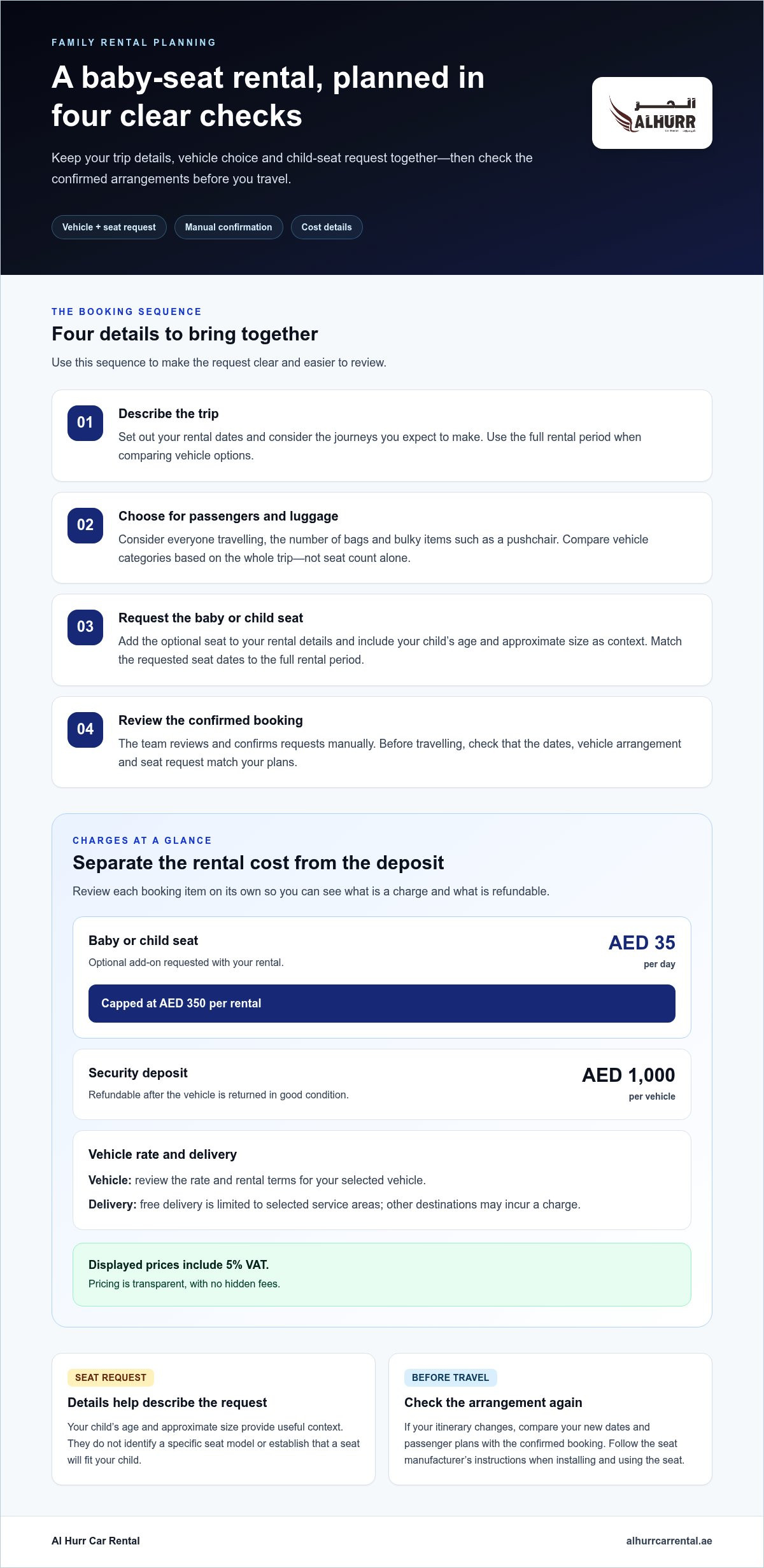
- Describe the trip. Set out your rental dates and consider the journeys you expect to make. This gives you a clear rental period to use when comparing vehicle options.
- Consider the passengers. Count everyone travelling and estimate the luggage you’ll bring. Use both details to guide your vehicle category choice.
- Request the seat. Include the baby or child seat with your rental details. Add your child’s age and approximate size as context for the request.
- Review the confirmation. Once the team confirms the booking, check that the dates, vehicle arrangement and requested add-on match your plans.
Keeping the seat request and rental details together gives you one booking to review. If your itinerary changes, compare the new plan with the confirmed information instead of relying on what you remember submitting.
Review the requested arrangement before travel
When the confirmation arrives, check it against your travel plans. Verify the rental dates, selected vehicle and child-seat request. If your dates or passenger plans have changed, make sure the confirmed details reflect the arrangement you intend to use.
Keep the confirmation accessible with your travel documents. To compare vehicle options with your passenger and luggage needs, browse the available rental car categories before you book.
Compare the Child-Seat Add-On, Rental Charges and Delivery
To understand the cost of a family rental, review the vehicle rate, child-seat add-on, security deposit and delivery terms separately. The deposit is refundable, while delivery charges depend on the destination. Checking each item helps you understand what is payable and what is held as a deposit.
| Booking item | What to review |
|---|---|
| Rental vehicle | Check the rate and rental terms shown for your selected vehicle. Displayed prices include 5% VAT. |
| Baby or child seat | An optional add-on costing AED 35 per day, capped at AED 350 per rental. |
| Refundable security deposit | AED 1,000 per vehicle, refundable after the vehicle is returned in good condition. |
| Vehicle delivery | Free delivery is limited to selected service areas. Other destinations may incur a charge. |
Understand the baby or child seat charge
Budget for the child-seat add-on separately from the vehicle rate. It costs AED 35 per day, with a maximum charge of AED 350 per rental. When reviewing your booking, check that the requested add-on and its charge are clear alongside the vehicle details.
Al Hurr Car Rental’s pricing is transparent, with no hidden fees. Displayed prices include 5% VAT, which is itemised at checkout rather than added on top. Review the displayed booking amounts and terms for the vehicle and optional add-on before submitting your request.
Understand deposit and delivery terms
The security deposit is AED 1,000 per vehicle and is refundable after the vehicle is returned in good condition. Keep it separate in your budget from the rental rate and optional add-ons. A zero-deposit option may be available on selected vehicles, so check the terms shown for the vehicle you choose rather than assuming it applies to every rental.
Free delivery is limited to selected service areas; delivery to other destinations may incur a charge. Review the delivery terms for your booking and include any applicable charge in your trip budget. Don’t assume that delivery is free at every destination.
For a clear cost comparison, start with the displayed rate for your selected vehicle, then review the child-seat charge, deposit and delivery terms as separate items. Browse the available rental vehicles and compare the categories with your passenger and luggage needs before choosing.
Prepare Your Documents and Booking Details for a Family Rental
Before arranging a car rental with baby seat Sharjah, gather your travel dates, vehicle preferences, child details and driving documents. Preparing them first helps you enter consistent information and spot missing details before submitting your request.
Prepare your booking details
Start with your rental dates, then choose a vehicle category based on your passengers and luggage. Note your child’s age and approximate size so you can include them with the seat request. These details provide context, but don’t assume a particular seat model or fit.
- Rental period: Have your planned pick-up and return dates ready.
- Vehicle needs: Consider how many people will travel and how much luggage you expect to carry.
- Child-seat request: Include the request with your rental details, along with your child’s age and approximate size.
- Driving documents: Prepare the documents required for your residency and travel status.
Prepare the right rental documents
The documents you need depend on whether you live in the UAE or are visiting. Keep the applicable documents together so you can provide the correct details during the online booking process.
- UAE residents: Emirates ID and a valid UAE driving licence.
- Tourists and visitors: Passport, valid visa and a valid home-country driving licence. An International Driving Permit is required if applicable.
Enter your details as they appear on your documents to keep the driver and rental information consistent. If you’re visiting, have your passport, visa and licence details ready before you begin the request.
Submit and review the booking request
Book online and enter your rental dates, vehicle preference and child-seat request in the relevant details. Payment is by secure online card payment. Submitting a request does not mean the booking is confirmed immediately: the Al Hurr Car Rental team reviews and confirms bookings manually.
After you receive confirmation, check that the dates, vehicle arrangement and child-seat request match what you submitted. If you’re still planning the wider trip, this practical UAE car rental guide can help you consider vehicle options alongside your family’s travel needs.
With your documents and booking details ready, you can complete the request with fewer interruptions. Browse rental vehicles and choose a category that suits your passengers and luggage before submitting your booking.
Book Your UAE Car Rental with a Baby Seat Through Al Hurr Car Rental
Bring the key choices together for your family rental: choose a vehicle category that suits your passengers and luggage, request the baby or child seat, then review the confirmed booking details. This helps you check the arrangement before travelling and plan around your family’s needs.
The child-seat add-on costs AED 35 per day, capped at AED 350 per rental. Displayed prices include 5% VAT, which is itemised at checkout. Keep the add-on separate from the vehicle rate as you review the booking, and check delivery terms for any charge that applies to your destination.
Free delivery is limited to selected service areas. Delivery to other destinations may incur a charge, so review the terms shown for your booking rather than assuming delivery is free everywhere.
What to expect after submitting your request
An online request is not an instant confirmation. The Al Hurr Car Rental team reviews and confirms bookings manually, so allow for that step in your plans. Use the team’s confirmation as the reference for your rental arrangement.
Read the confirmation carefully. Check the rental dates, selected vehicle and child-seat request against what you submitted. Reviewing them together makes it easier to spot a mismatch while you’re still planning.
Keep the confirmed booking information accessible with your travel documents. If delivery is part of your arrangement, check the destination and any applicable charge in the booking details too.
Take the next step with confidence
A clear booking starts with accurate details and a careful review of the terms. Choose a vehicle based on your passengers and luggage, include the child-seat request with your rental information, and use the confirmed details to plan ahead. Transparent pricing helps you distinguish the seat add-on from the vehicle rate, while the delivery terms clarify any destination-based charge.
Ready to plan your family journey? Browse rental vehicles, choose a category that fits your plans, and begin your online booking with Al Hurr Car Rental.
Set Your Family Journey in Motion
Family travel is easier to organise when your transport suits the way you plan to travel. As you prepare for a car rental with baby seat Sharjah, consider your arrival plans, the places you’ll visit and how much luggage you’ll bring. These details can help you choose a vehicle and prepare a complete request.
Allow time to enter accurate details and read the booking confirmation carefully. Check that the dates, vehicle and requested seat match your plans, and keep the confirmed information with your travel documents. That simple review can help you start the trip with the arrangements in order.
When you’re ready, start your rental booking with Al Hurr Car Rental. Choose a vehicle for your journey, include your child-seat request and review the confirmed details before you travel.
Frequently Asked Questions
Can I rent a car with a baby seat from Al Hurr Car Rental?
Yes. You can request a baby or child seat as an optional rental add-on. Include it with your rental dates and your child’s age and approximate size. Bookings are reviewed manually, so wait for the team’s confirmation and check the confirmed details before finalising your travel plans.
How much does a baby seat cost with a rental car?
The baby or child-seat add-on costs AED 35 per day, capped at AED 350 per rental. It is separate from the vehicle rate. Displayed prices include 5% VAT, which is itemised at checkout. Review your booking details for the vehicle rate and requested add-ons.
Should I book a rental car with a child seat in advance?
Include the seat request when you make your rental request so you can review it alongside the dates and vehicle arrangement. Bookings require manual review and confirmation, so submitting an online request does not mean it is confirmed immediately. Check the confirmed details against your itinerary before travelling.
What documents do I need to rent a car in the UAE?
UAE residents need an Emirates ID and a valid UAE driving licence. Tourists and visitors need a passport, valid visa and home-country driving licence, plus an International Driving Permit if required. Payment is by secure online card payment, and bookings are confirmed after manual review by the rental team.
Is the security deposit refundable on a rental car?
The security deposit is AED 1,000 per vehicle and is refundable after the vehicle is returned in good condition. A zero-deposit option may be available on selected vehicles. Review the deposit terms for your chosen vehicle and in your booking confirmation.
Does car delivery with a baby seat cost extra?
Free delivery is limited to selected service areas. Delivery to other destinations may incur a charge, so check the delivery terms in your booking details. Delivery is separate from the child-seat add-on, which costs AED 35 per day and is capped at AED 350 per rental.